
Repertoire visualisation
See the whole repertoire, not one move at a time
The tree lays out every branch you have saved, with the line you are on lit up, so you can tell where a variation leads before you commit to it.
Chess opening repertoire training
Build your chess opening repertoire, keep it sharp with performance-based spaced repetition, and reach the middlegame on your own terms.


Free to start on iOS and Android · no account needed · no repertoire or move limit


 Lichess Opening database and studies
  Stockfish Analysis on the board
 Chess Prep Pro connects to the Lichess opening database and uses Stockfish for analysis. It is not affiliated with or endorsed by either project.
Three steps
Play the moves on the board to create your opening lines, or import PGN files from Lichess, Chess.com, ChessBase, and other chess software. The Blind Spot Finder then shows you the common replies you have not prepared for yet.
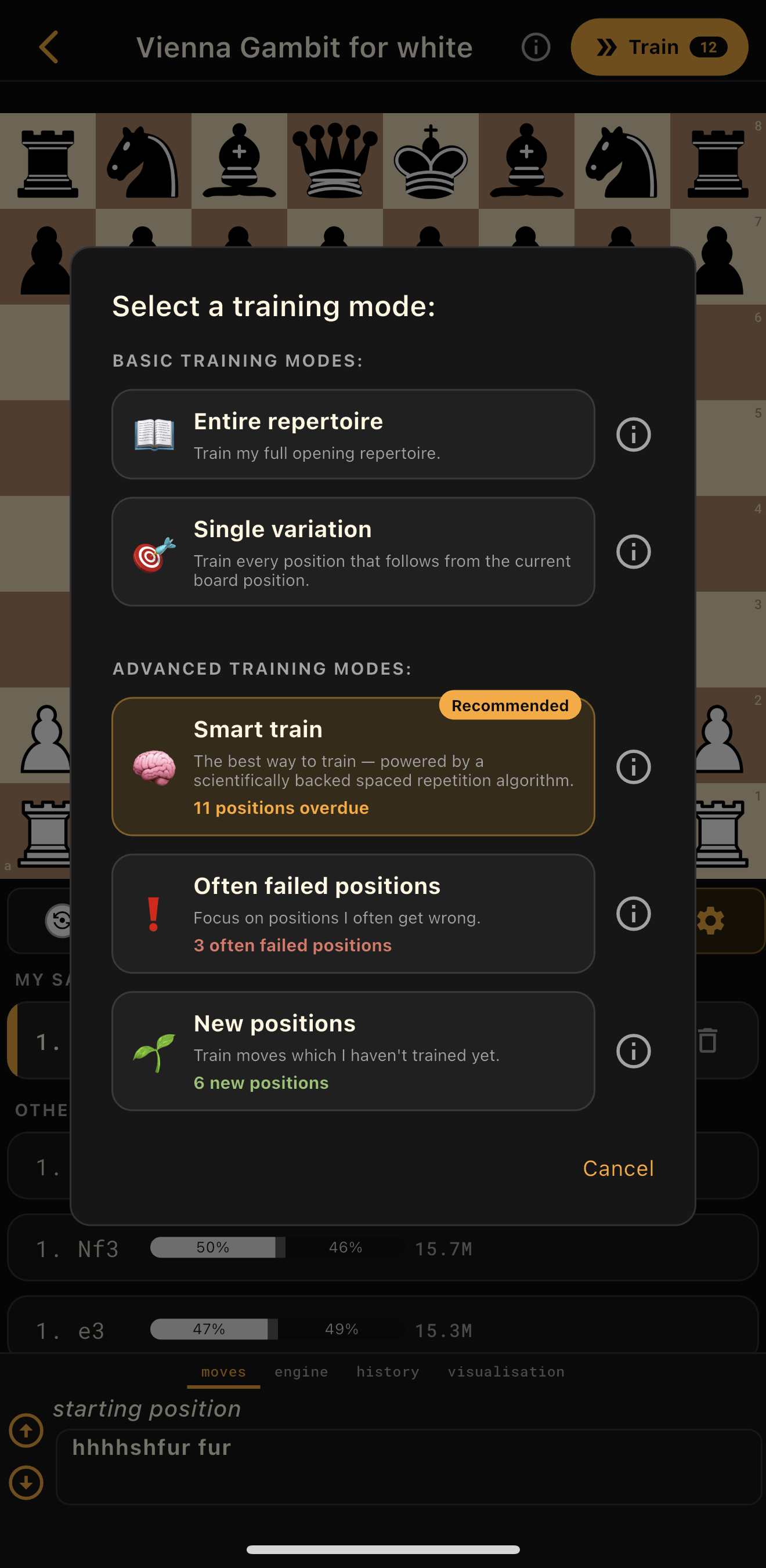
Smart Train's performance-based spaced repetition brings back the moves you keep missing. Or take control yourself: practise your entire repertoire, revisit failed positions, learn new moves, or drill one specific line.
Regular active-recall practice turns preparation into recognition, so you spend your clock on the middlegame instead of trying to remember what you studied.
Product tour
A look inside the app.
Repertoire visualisation
The tree lays out every branch you have saved, with the line you are on lit up, so you can tell where a variation leads before you commit to it.
Stockfish
The engine runs on the same board you build on, so a move you invented is a move you have tested rather than one you hope is sound.
Opening book
Every reply from the current position, how often it is chosen and how it scores. The move your opponent is most likely to play is often not the best one, and that gap is what you prepare against.
Smart Train
PremiumSpaced repetition tracks how you perform on every position and schedules the next review from that. Recall it easily and the gap widens; miss it and it comes back sooner.
Blind Spot Finder
PremiumScans your whole repertoire against the game database and lists the opponent moves you have no answer to, most likely first.
Smart Trim
PremiumThe opposite job: it finds the branches that almost never occur in real games, so your review time goes somewhere useful.
Often Failed Positions
PremiumYour training history remembers every miss, so the positions costing you games are one tap away.
Import and export
Lichess studies, PGN from Chess.com, ChessBase or anywhere online, plain text, or the moves from a video you played in by hand. Everything exports back out, so your work is never locked to one app.
The real thing
Screens from the app, untouched.
Intuitive repertoire building

Advanced chess opening training
Smart Train spaced repetition

Lichess database and Stockfish analysis

Blind Spot Finder

PGN import and export

Downloadable opening repertoires
From chess players
Very helpful app! Would recommend, especially if you are a beginner to chess. It helps you build your repertoire, which is a really important factor when it comes to being a better chess player. It's super simple, not complicated at all. It offers repertoires free to download if you don't know how to build your own. Very customizable; you can change the color scheme to your liking. Also, it is very accessible even without premium. It's amazing!
Love it! I had a lot of time looking for a good app to enhance chess openings. With this app, you can use their repertoires or upload your own studies. Likewise, the interface is intuitive. It's similar to ChessBase for the tool to try openings, but it's easier to use and from your smartphone.
Absolutely the best app to study chess openings! Graphic interface is based on Lichess, you can go on without move limits, and so you can study every branch of an opening and win chances of each move.
Frequently asked questions
Still unsure? Email chessprepprohelp@gmail.com.
A chess opening repertoire is your personal collection of opening moves and variations for White and Black. It gives you prepared responses to common opponent moves, reducing guesswork and helping you reach familiar positions.
An opening is one way of starting the game, such as the Caro-Kann. A repertoire is the whole set of openings you have decided to play, together with your answer to each reply your opponent might choose. One repertoire contains many openings, and each opening contains many lines.
A small one helps sooner than most people expect. You do not need twenty moves of theory, but having a first move you always play and an answer to the two or three replies you meet most often will save you time on the clock in every single game.
No. You can build unlimited custom repertoires and add as many moves and variations as you need.
Chess Prep Pro uses active recall: it presents positions from your repertoire and asks you to find the continuation. Its training modes let you practise everything or focus on failed positions, new moves, specific lines, or positions scheduled by Smart Train.
Smart Train uses spaced repetition to show you positions right when you are about to forget them. When you get a position right, it waits longer before showing it again. When you get it wrong, it shows it sooner. This helps you remember more with less practice time.
The core functionality remains free. Premium adds optional features; the app shows the current benefits before you purchase.
Chess Prep Pro is available for mobile devices through Google Play and the Apple App Store.
Chess Prep Pro is for building your opening repertoires and then training your memory of them. The tutorial in the app's settings page gives a more detailed walk-through.
Yes, typically you should create separate repertoires for White and Black. When you play White, you start the game and choose your opening moves. When you play Black, you respond to your opponent's opening. These require different strategies and move sequences, so it makes sense to organise them separately. You can name your repertoires clearly (like "My White Repertoire" and "My Black Repertoire") to keep them organised, and you can create as many repertoires as you want.
Free features include creating unlimited repertoires, the basic training modes (Entire Repertoire and Single Variation), importing and exporting PGN, the analysis board with engine, and the opening book. Premium adds Smart Train (spaced repetition), Often Failed Positions and New Positions training modes, Blind Spot Finder, Smart Trim, re-train failed positions, unlimited repertoire downloads, cloud backup and sync, and an ad-free experience.
Smart Train uses spaced repetition; Entire Repertoire covers all positions; Single Variation focuses on one specific line; Often Failed Positions targets your weak spots; and New Positions practises recently added moves.
Training is both structured and randomised so it feels like real games. It starts from the beginning of your repertoire and plays through one complete line at a time. When your opponent has multiple possible moves, the app randomly picks one for you to respond to. After reaching the end of a line, it rewinds back through that line to check whether there are other opponent moves you have not practised yet, then continues from one of those. Training therefore never jumps randomly between unrelated positions; it systematically explores each branch while randomising the opponent's choices, so over many sessions every position gets equal practice. Training filters and training modes can further narrow which positions appear.
When a position has multiple possible opponent moves, the app returns to it so you can practise responding to each one. If your opponent has three possible moves from a position, you will meet that position three times. If you have imported a large PGN and want to train only the main lines, enable "Train main lines only" in the Additional Training Settings menu.
Training modes determine which positions to practise: Entire Repertoire, Single Variation, Smart Train, Often Failed Positions, and New Positions. Training filters are additional restrictions you apply on top of any mode, such as depth limits (for example, only train the first ten moves), move history filters, or training main lines only. You will find them in the Additional Training Settings menu.
Yes. You can retrain missed positions after a session or target positions you often fail using the training filters and Often Failed Positions mode.
There is no fixed amount that guarantees a particular result. Smart Train schedules positions for you automatically; with the other modes, choose a short, regular routine you can sustain and use your training history to decide where to focus. Consistency matters more than session length.
"<<" rewinds to the last branching point in your repertoire, meaning the last position where several moves are saved. "<" rewinds by one move. ">" goes forward one move using the first saved move in your repertoire. ">>" goes forward to the next branching point, following the first saved move in each position along the way.
Yes. Hold the move in the list and drag it down to the position you want.
Transpositions occur when different move orders lead to the same position. For example, 1.e4 e5 2.Nf3 Nc6 reaches the same position as 1.Nf3 Nc6 2.e4 e5. Chess Prep Pro handles transpositions automatically, recognising when positions are identical regardless of how you reached them.
The opening book, also called the Lichess explorer, is a database of real chess games. In the analysis board you can enable it to see how often each move is played from the current position, along with win, draw and loss statistics. This helps you find the likely opponent responses and prepare for them. Enable the opening book option in the analysis board and the statistics appear next to each possible move.
Chess Prep Pro includes a built-in opening statistics database covering around 10,000 of the most common positions for each rating level, with the play rate, win rate and draw rate for every move.
That only covers the most popular openings. If you play less common lines, or want statistics deeper into your repertoire, connecting a free Lichess account lets the app reach the full Lichess opening database, giving you statistics on virtually every position in the opening book. A connection is also what lets Blind Spot Finder and Smart Trim scan your entire repertoire; without one they still work, but only against the limited local database.
To connect, open the analysis board, go to the opening book settings and tap the connection status. The app only uses the connection to read the game database. No personal data is read from your Lichess account, and a throwaway account works fine.
The opening database shows common moves from the current position. Blind Spot Finder scans positions and variations throughout your repertoire to identify likely opponent continuations you have not prepared for.
Both are premium features that optimise your repertoire. Blind Spot Finder scans your repertoire against the game database to find likely opponent moves you have not prepared for, filling the gaps in your preparation. Smart Trim does the opposite: it identifies opponent moves in your repertoire that rarely occur in real games, so you can focus on what matters.
Chess Prep Pro comfortably handles a few hundred to a few thousand positions per repertoire. It is designed for building and training opening repertoires rather than storing large chess databases, so importing very large PGN files may cause performance issues.
These are ready-made repertoires you can download if you are stuck creating your own. They are built from various YouTube videos, Lichess studies, or our own repertoires, and the original source is listed in the repertoire description where applicable. Building a custom repertoire to match your own playing style is usually better, but a downloaded one is a solid foundation you can modify.
Yes. Downloaded repertoires are fully editable: you can add moves, delete moves, reorder them, and change comments. They are useful templates to get started, and you can customise them until they suit the way you play.
The levels reflect the developer's own assessment, based mainly on the size of the repertoire and the complexity of the opening ideas. Get in touch if you believe a repertoire has an inaccurate level.
In the analysis board, tap the settings icon and choose Import/Export. You can paste PGN text directly, import a PGN file from your device storage, or import a Lichess study. For a Lichess study, use the Study PGN button in the share section on Lichess to download the file first, then select it in the app.
Export the repertoire as PGN text or a PGN file, then send it to someone who can import it into their own repertoire.
You need an account to download premade repertoires, back up your repertoires, or purchase premium. You can use the other core functionality without an account.
Premium is linked to your Chess Prep Pro account, so you can use it on another supported device after signing into the same account. You lose access to premium features while signed out.
You keep access to your premium features until the date your subscription would have renewed. You can cancel any time and resubscribe any time.
Yes. With a premium account your progress and repertoires can be backed up and synced across multiple devices; sign in on any device to reach your data. Without premium you can export your repertoires with the PGN export feature and import them elsewhere.
With premium you can back up repertoires to your Chess Prep Pro account from the repertoire's analysis screen: tap the gear icon and choose Backup. The backup is manual because it works as a checkpoint system, so you can either upload your latest changes or restore the last saved checkpoint. Once you sign in on a new device, your backed-up repertoires appear in My Repertoires. Free users can export repertoires to PGN files and re-import them after reinstalling.
Please back up before uninstalling: if you uninstall the app, your repertoires are lost unless you have used the premium backup, exported PGN files, or your device has its own backup system. PGN backups preserve moves and comments only. They do not save the statistics and move training history that Smart Train and the other modes rely on, so backing up to your account keeps more.
Most app features work offline. You need a connection for downloading repertoires, the opening database, Blind Spot Finder, and account-related actions.
Email ChessPrepProHelp@gmail.com to suggest an improvement, report a bug, or ask a question.
Available on iOS and Android
Download Chess Prep Pro for iOS or Android and start training the chess openings you actually play.
No account needed · no repertoire or move limit · premium optional
